

 By Anna
A remote mower comes back hot, or the handset shows a heat warning, and the crew needs to know what to write on the job card. Lawn mower overheating is rarely answered by the fuel type alone. The first question is not "what failed" but "which component is reporting the problem" — and on a mixed fleet that answer changes the whole diagnostic path.
On a remote mower, overheating can involve the combustion engine, one or more electric drive or blade motors, the battery pack, or the controller — and the power source alone does not tell you which. Record the warning and the machine identity, stop safely per the current manual, and hand diagnosis to qualified service rather than guessing.
This article is written for field supervisors running remote-controlled mower fleets and for dealer service and repair dispatchers. It does not diagnose a specific machine. It sets out how to separate engine-side and motor-side overheating symptoms, what to record before the machine leaves the site, and when the question belongs to a technician. Super Mowers' published configurations are useful here because they show why one fleet can contain two different cooling stories: the DY-550L is described as a gasoline engine with electric drive for travel, while the DY-550E is a lithium-electric platform. Those are not the same cooling system, and they should not be triaged with the same checklist. For a broader view of how the two platforms differ, see electric vs gas remote control mower.
Lawn mower overheating: Which component reports overheating?
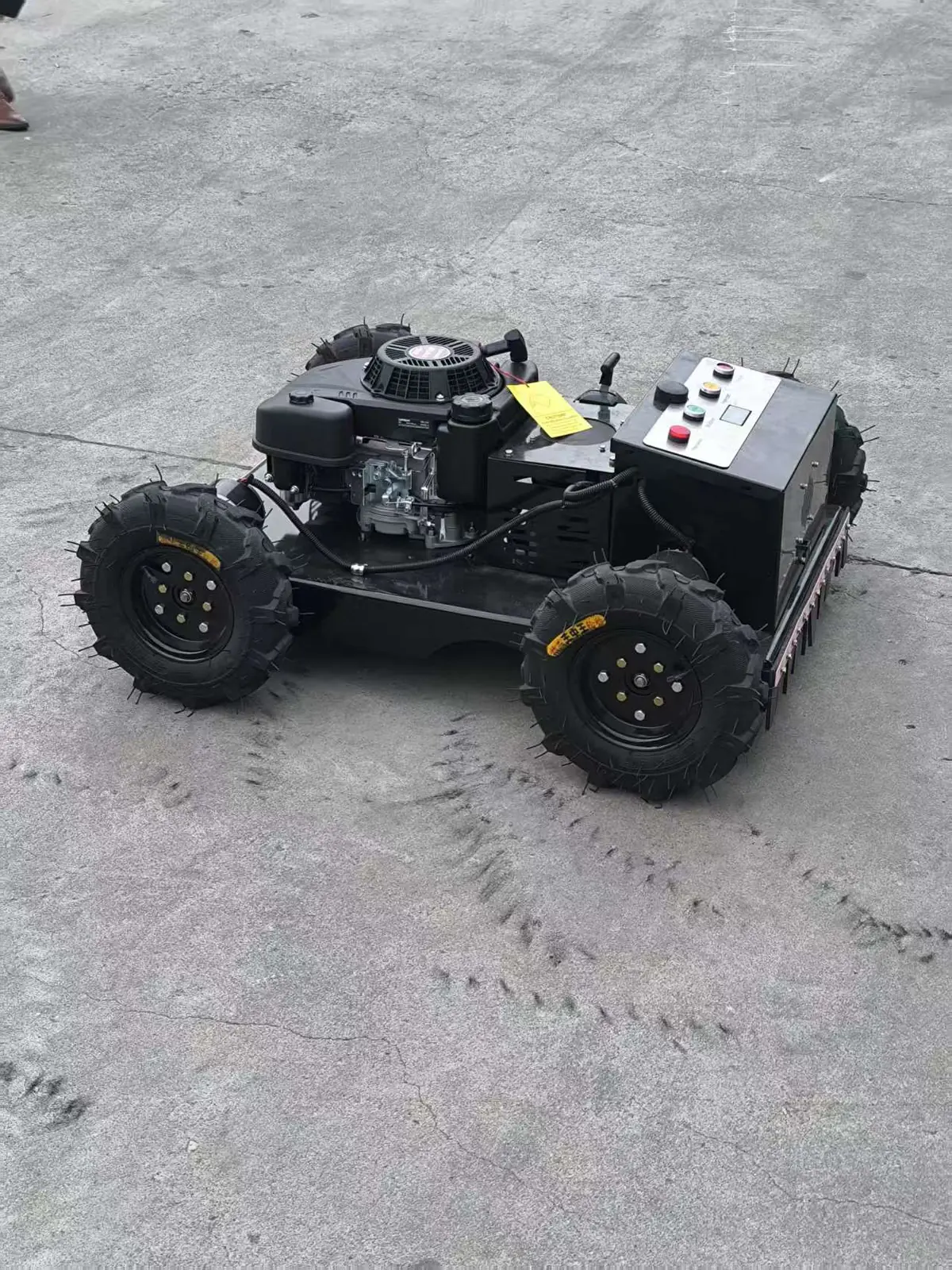
The first job is to identify the reporting component, not the fuel type. A heat alarm is a signal from a specific sensor or protection circuit on a specific machine, and the same word — "overheating" — can describe a cylinder head running hot, a motor winding reaching a thermal limit, a battery pack refusing charge or discharge, or a controller derating because its own temperature rose.
Separate engine, traction motor, blade motor and battery when actually fitted
On a machine like the DY-550L, the gasoline engine and the electric travel drive are separate systems that can each develop heat problems. On a lithium platform like the DY-550E, the engine is absent, so any heat event must be traced to the electric side — but "the electric side" is still not one thing. Traction motors, blade motors, the battery pack and the controller are different components with different thermal behaviour, different sensors and different service responses.
A practical way to think about it is to ask what the machine was doing when the warning appeared:
- Travelling on a slope or in tall, wet grass under load — the travel drive and its motor or controller are doing sustained work.
- Cutting heavy vegetation with the deck engaged — blade motors or the engine driving the deck are loaded.
- Sitting in sun between jobs, or immediately after a charge — the battery pack may be the component at temperature, particularly on a lithium platform.
- No clear load pattern, warning appears early in a shift — this points toward a cooling-path restriction, a sensor issue or a component fault rather than a workload explanation.
None of these patterns proves a cause. They are observations that help a technician decide where to start, and they belong on the handover record.
Do not infer a warning system from the power source
It is tempting to assume that a lithium machine has full electronic thermal protection on every component, or that a gasoline machine has none. Neither assumption is safe. Warning behaviour is a property of the specific model and its controller configuration, not of the fuel type. A machine may report a motor temperature, a battery temperature, a controller derating event, or nothing at all beyond a loss of performance.
This matters for the crew because the absence of a warning is not evidence that nothing is hot, and the presence of a warning is not evidence that the named component is the failed one. The MOWRATOR troubleshooting page is a useful example of how one manufacturer documents heat alarms for its own electric machines; it is not evidence that a Super Mowers model uses the same alarm logic, the same codes or the same reset behaviour. Treat any alarm description as model-specific until the manual for that exact machine confirms it.
Compare the cooling paths
Once the reporting component is identified, the next question is how that component is meant to shed heat — and whether the path is shared with anything else. Cooling paths differ enough between an engine and an electric drive that a single "clean the machine" instruction is not adequate triage.
Use Briggs and MOWRATOR examples only for their documented machines
Briggs & Stratton's published guidance on cleaning an engine describes the cooling path of a small air-cooled combustion engine: air is drawn in, passes over finned surfaces, and carries heat away, and debris that blocks that flow reduces cooling. That is useful background for understanding why an engine-side heat problem often involves grass clippings, dust and chaff packed around fins or behind covers. It is background, not a repair procedure, and it does not tell you how to clean any particular Super Mowers engine installation or which covers may be removed.
On the electric side, the MOWRATOR troubleshooting page illustrates a different model of support: an electric machine reports a thermal condition through its control system, and the manufacturer publishes a troubleshooting path for its own product. Again, the value is in the shape of the problem — an electric drive can report heat electronically — not in the specific steps, which belong to that brand's machines.
What both examples share is a limit: each describes one manufacturer's machines. Neither can be used to conclude that a Super Mowers engine has a particular cover arrangement, or that a Super Mowers lithium model reports a particular alarm. Those details come from the manual supplied with the exact model and revision.
Distinguish combustion-air filtration from cooling-air flow
A frequent source of confusion is the difference between the air that feeds combustion and the air that cools the engine. The air filter protects the intake tract; a dirty filter restricts combustion air and affects running quality. The cooling airflow is a separate path that passes over the engine's exterior surfaces and fins. Debris in the cooling path does not show up as a dirty intake filter, and a clean intake filter does not prove the cooling path is clear.
For the crew, this distinction has a simple practical consequence: "the filter looked fine" is not an answer to a heat question. The relevant observation is whether the external cooling path — the visible intake, the fins, the area behind covers that the manual permits you to see — is obstructed. If the manual does not permit inspection of a particular area, that observation is not available to the crew and belongs to service.
| Component | Typical heat source | What the crew can usually observe | What belongs to service |
|---|---|---|---|
| Gasoline engine (e.g. DY-550L engine side) | Combustion heat, load, restricted cooling airflow | Visible debris around external cooling areas the manual allows you to see; performance complaints | Internal condition, fin cleaning behind covers, any adjustment |
| Traction motor / drive | Sustained travel load, slope work, controller derating | Warning presence, load pattern, terrain at time of alarm | Motor temperature diagnosis, controller logs, wiring checks |
| Blade motor or deck drive | Cutting load, heavy or wet vegetation | Vegetation conditions, deck behaviour, warning timing | Motor and drive diagnosis, mechanical binding checks |
| Battery pack (lithium platform, e.g. DY-550E) | Charge/discharge heat, ambient temperature | Ambient conditions, time since charge, warning presence | Pack temperature diagnosis, charging system checks |
| Controller / electronics | Sustained current, enclosure heat | Warning or derating behaviour, ambient conditions | Log retrieval, fault-code interpretation |
This table is a triage aid, not a specification. The components actually fitted, the sensors present and the warnings available must be confirmed against the manual for the exact machine.
What the crew should record
A heat event that is not recorded becomes a guess by the time the machine reaches the workshop. The most valuable thing a field supervisor can do is capture a consistent set of observations while the machine is still on site and the conditions are still known.
Application review
Discuss your mowing application.
Share the working condition, target market, product family and project scope.
Record warning, operating conditions, visible debris and affected machine identity
A workable record covers five things:
- Machine identity. Model, unit or fleet number, and the manual revision if it is to hand. On a mixed fleet, "the remote mower" is not enough — a DY-550L and a DY-550E need different diagnostic routes.
- The warning itself. What was displayed, what the handset showed, whether the machine derated, stopped, or continued at reduced performance, and whether the warning cleared on its own.
- Operating conditions. Terrain, slope direction if relevant, grass height and moisture, ambient temperature, how long the machine had been running, and what it had been doing in the minutes before the warning.
- Visible debris. What could be seen in the cooling areas the manual permits you to look at — clippings, chaff, dust, mud — without removing covers or reaching into the machine.
- What was done next. Whether the machine was stopped, moved, left to cool, or restarted, and by whom.
A short form on the handset or a paper card is enough. The point is consistency across the fleet, so that a dealer can compare one event with another. Fleets that run both platforms may find the commercial remote control lawn mower overview useful when briefing new supervisors on which units they are responsible for.
Do not open hot or energized parts
A machine that has just reported a heat event is not a machine to start dismantling at the roadside. Covers, guards and enclosures are there for a reason, and on an electric platform the components behind them may be energized even when the machine appears idle. The crew's job ends at observation and safe shutdown. Removing covers, probing connectors, or reaching into a deck or motor housing to "check" for heat is service work, and on a hot machine it is also a burn and injury risk.
If the manual for the exact model specifies a safe shutdown and cooling procedure, follow it. If it does not, or if it is not available on site, stop the machine in a safe place, keep people clear, and escalate.
When and how to escalate
Escalation is not a failure of the crew's competence; it is the correct next step once the observation stage is complete. The question is what to escalate and to whom.
Apply the current manufacturer's safe shutdown and cooling instructions
The current manual for the exact model and revision is the authority for shutdown, cooling time, and what may be inspected. This is where model differences matter most: a gasoline engine and a lithium pack have different hazards after a heat event, and a procedure written for one should never be applied to the other. If the manual is missing, the correct action is to obtain it, not to substitute a procedure from another machine or another brand.
Refer persistent alarms and damaged components to qualified service
Some heat events resolve after the machine cools and the cooling path is cleared of visible debris, within whatever the manual permits. Others do not. Escalate when:
- the warning returns after a documented cooldown;
- the machine derates or stops repeatedly under normal load;
- there is visible damage — melted or discoloured parts, damaged wiring, a deformed cover, or a damaged battery enclosure;
- the same unit reports heat events across different jobs and operators;
- the manual requires a service action that the crew is not authorised or equipped to perform.
The handover should include the record described above, the manual revision used, and a clear statement of what was and was not done. A dealer service desk can then route the job to the right technician instead of starting from zero.
| Escalation trigger | Urgency | Who handles it |
|---|---|---|
| Warning cleared after documented cooldown, no visible damage | Routine | Crew records; dealer reviews at next service |
| Warning returns under normal load | Prompt | Dealer service, with full event record |
| Visible damage to covers, wiring or battery enclosure | Immediate stop | Qualified service; do not operate |
| Repeated events across operators on one unit | Prompt | Fleet supervisor and dealer, to check pattern |
| Manual requires action beyond crew scope | Per manual | Qualified service |
FAQ

Can an electric motor overheat without an engine?
Yes. On a lithium-electric platform such as the DY-550E there is no combustion engine, so any heat event must involve the electric side — a motor, the battery pack, the controller or the wiring. That does not mean every electric component is monitored or that the warning names the failed part; the manual for the exact model defines what is reported.
Does a dirty air filter prove the cause?
No. The intake air filter and the engine cooling airflow are different paths. A dirty filter points to a combustion-air restriction; it says nothing conclusive about whether the external cooling path is blocked, and on an electric machine there is no combustion-air filter at all. Treat a dirty filter as one observation, not a diagnosis.
Can another brand's reset sequence be copied?
No. Reset behaviour, alarm codes and cooldown requirements are properties of a specific model and its controller. A sequence published by another manufacturer — including the MOWRATOR troubleshooting guidance referenced here — applies to that manufacturer's machines. Using it on a Super Mowers unit risks masking a real fault or restarting a machine that should stay stopped.
Conclusion
Identify the reporting component, record the event, stop safely per the exact manual, and hand diagnosis to qualified service. That sequence keeps a mixed remote mower fleet from being triaged by guesswork.
Video: Drive Overheat
