


 By Anna
A remote flail mower that starts shaking mid-shift forces a quick decision: keep cutting, or stop and report it? For fleet supervisors and dealer service desks, the useful answer is not a diagnosis but a record — when the vibration began, what changed, and which machine it was. Sorting out flail mower vibration causes is a job for qualified service staff; the fleet's job is an accurate handoff.
Stop the machine, follow its own manual and site rules, and record the event before anyone inspects it. New or worsening vibration is a symptom with several possible sources — rotor, flails, bearings or supports, and others — so the fleet's job is an accurate handoff, not a one-cause verdict.
This guide is about the paperwork and questions around a vibration event, not about opening the machine. It also explains why instructions written for tractor-mounted, PTO-driven flails cannot simply be pasted onto a remote-control unit, and how two named remote-machine manuals handle the same symptom differently.
Flail mower vibration causes: Describe when the vibration began and what changed

The first record is a timeline. Vibration that appears suddenly after a bump is a different report from vibration that built up gradually across several shifts, and a service team needs that distinction before it can decide what to check. Write down the stage of work when it started: travel to the site, first pass, a change of vegetation, a turn, or the run back to the trailer.
Then record what changed around the same time. Ask about a recent impact with a stump, rock, kerb or fence line; a change of operator; a new site with different grass or brush; a recent blade or flail change; a repair or part replacement; and any change in how the machine is transported. These are observations, not conclusions. A collision report does not prove the rotor is bent, and a recent flail change does not prove a flail is missing.
Describe the vibration itself in plain terms the service desk can use: constant or intermittent, present while travelling as well as cutting, worse at one cutting height, accompanied by noise, or accompanied by a change in cut quality. Note whether the operator stopped immediately or completed the pass, because that affects what else may have been affected.
Keep the description free of diagnosis. "Shaking started after striking a stump on the left side of the head, continues at travel speed" is more useful than "rotor out of balance". The second sentence closes off questions the service team may need to ask.
| What to record | Why it matters | Example entry (illustrative format) |
|---|---|---|
| Machine identity | Ties the report to the right manual and configuration | Model, serial/asset number, attachment fitted |
| Stage of work | Separates travel, cutting and transport symptoms | "Began on second pass, cutting tall grass" |
| What changed | Flags impacts, part changes, new sites or operators | "New site; operator reported rock strike" |
| Vibration behaviour | Helps the service team plan its questions | "Constant, worse at low cut height, with noise" |
| Action taken | Shows whether work stopped and when | "Stopped, parked, tagged, reported at 14:20" |
| Conditions | Grass type, ground, slope, weather, load | "Wet grass, uneven ground, moderate slope" |
Compare named McConnel remote flail-head and Spider remote rotary manuals

Two named manufacturers publish manuals for remote-controlled cutting equipment, and both treat excessive vibration as a stop-and-refer matter rather than a field fix. The McConnel RoboCut forestry/mulcher head operator and parts manual (Rev. 16.11.15, pre-April 2015 edition) includes a troubleshooting table that lists excessive vibration among the symptoms it addresses. The Spider MINI II remote rotary mower operation manual (rev. 08-15-02-2017) addresses vibration in its mowing-blade section and advises the operator to stop and contact the dealer.
Those are useful reference points for a fleet team because they are remote-machine documents, not tractor documents. They show that the manufacturer's own response to unexplained vibration is to stop and escalate. They do not tell a Super Mowers operator what to do, and they are not SM repair procedures.
The two machines also differ in cutting structure, which is why the comparison is worth recording rather than collapsing into one "flail vibration" note. A flail head cuts with swinging flails mounted on a horizontal rotor; a rotary mower such as the Spider MINI II cuts with blades that swing from a rotating carrier. The vibration questions a technician asks about a flail rotor assembly are not identical to those for a rotary blade carrier, even though both manuals use the same stop-and-refer logic.
| Reference | Machine type in the source | How vibration is treated in the source | What a fleet team can take from it |
|---|---|---|---|
| McConnel RoboCut forestry/mulcher head manual (Rev. 16.11.15) | Remote-controlled flail-type cutting head | Listed in a troubleshooting table as a symptom to address | Remote flail heads are documented as needing structured troubleshooting, not field guesswork |
| Spider MINI II operation manual (rev. 08-15-02-2017) | Remote rotary mower | Mowing-blade section advises stopping and contacting the dealer | Stop-and-refer is a normal manufacturer response to vibration |
| BE-EFGC flail mower manual (tractor-mounted) | Tractor-mounted, PTO-driven flail | Troubleshooting page covers vibration-type symptoms | Useful background on flail symptoms, but the drive arrangement differs |
| Farmry article on flail mower vibration | Tractor-powered equipment | Discusses rotor, bearing and PTO-related symptoms | Explains common causes in PTO machines; not a remote-machine procedure |
Record which document you consulted, its revision or date, and the page or section. That citation is part of the handoff: it tells the service team whether the fleet was working from a current manual or an older edition.
Separate those examples from the actual machine and avoid a one-cause diagnosis
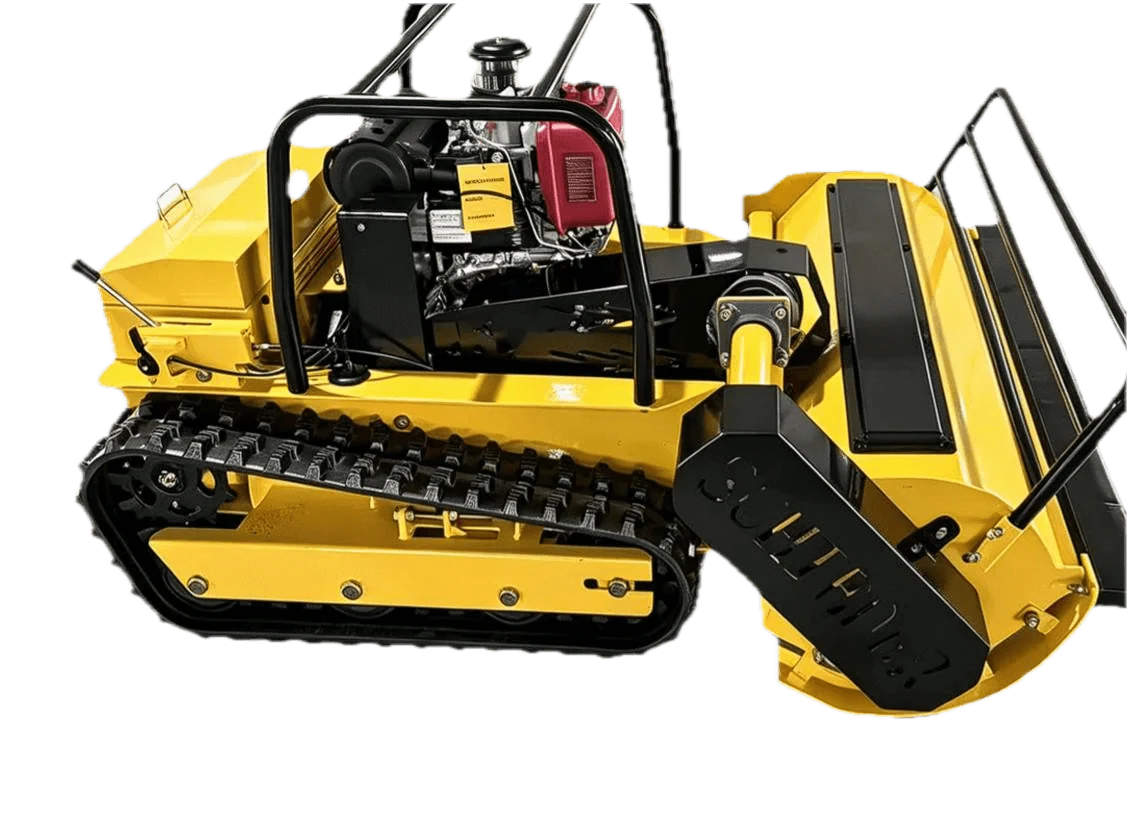
A named manual from another manufacturer is context, not configuration data. The machine in front of the operator has its own manual, its own attachment, its own control arrangement and its own service history. Before any comparison is used in a report, confirm the actual machine's identity and the manual revision that applies to it.
This matters most with drive arrangements. Tractor-mounted flail manuals, including the BE-EFGC document and the Farmry article's discussion of rotor, bearing and PTO symptoms, describe machines driven by a tractor power take-off. A remote-control mower is not driven that way, and its control and drive layout has to be read from its own documentation. Copying a PTO troubleshooting sequence onto a remote unit can send the service team looking for components the machine does not have.
Application review
Discuss your mowing application.
Share the working condition, target market, product family and project scope.
Super Mowers' current public listing for the SM Remote 50 gasoline model describes a tracked remote-control machine with a gasoline engine, electrically driven tracks and a flail configuration. That is a published configuration summary, not a verified statement about every unit in a fleet or about the drive path to the cutting head. Specific transmission details and the actual as-built configuration of any individual machine still need to be confirmed against its own documentation before they are written into a service report. The Super Mowers product catalogue is the place to check the published configuration summary for a given model.
Avoid the single-cause habit in both directions. A missing flail is one possible contributor to imbalance, but vibration can also relate to the rotor assembly, bearings or supports, mounting and attachment condition, the cutting conditions, or other causes a technician will assess. Equally, an impact does not automatically mean a damaged rotor. The report should list observations and let the qualified service team narrow the possibilities.
A practical way to keep the report neutral is to phrase each entry as an observation plus a question. "Vibration continues during travel with the head raised — does this point to the drive or mounting rather than the flails?" This gives the service desk a starting point without asserting a fault.
For scheduled care between events, the flail mower maintenance checklist for fleet records covers planned inspections, and the commercial mower blade sharpening schedule explains how cutting-component condition fits into a maintenance calendar. Neither replaces a vibration-event report. If the fleet also runs rotary units, the flail mower vs rotary mower comparison helps keep the two cutting structures distinct when writing the report.
Record model, conditions and authorized-service handoff

A vibration report earns its value at handover. The service team should be able to identify the machine, understand the conditions, see what was already checked without disassembly, and know who to contact. Build the handoff around four blocks: identity, event, conditions and actions.
Identity means model, asset or serial number, attachment fitted, manual revision used, and the machine's recent service history. Event means the timeline and description from the first section, including whether the vibration is new, recurring or worsening. Conditions means the vegetation, ground, slope, cutting height, weather and workload at the time. Actions means what the operator and supervisor did: stopped, parked, tagged, isolated according to site procedure, and reported.
| Handoff block | Items to include | Owner |
|---|---|---|
| Machine identity | Model, asset/serial number, attachment, manual revision | Fleet supervisor |
| Event description | Start time, stage of work, what changed, vibration behaviour | Operator with supervisor |
| Conditions | Vegetation, ground, slope, cutting height, weather | Operator |
| Actions taken | Stop, park, tag, isolate, report time | Operator and site lead |
| Contact and availability | Site contact, machine location, access notes | Fleet supervisor |
| Open questions | Specific points for the service team to assess | Fleet supervisor |
Keep the report factual and dated, and attach photos only if site rules allow and the images show what the text describes. Do not attempt repairs, adjustments or component removal to "help" the diagnosis; the machine's manual and the service provider's instructions govern what happens next. If the manual or dealer guidance says stop, the machine stays out of service until it is cleared.
For dealer service desks, the same record works in reverse: ask the customer for these blocks when a vibration call comes in. A structured request shortens the conversation and reduces the chance that a machine is returned to work on an assumption.
FAQ

Does a missing flail always explain vibration? No. A missing or damaged flail is one possible contributor, but vibration can also involve the rotor assembly, bearings or supports, mounting, cutting conditions or other causes. Record the observation and let a qualified service team assess it; do not treat a missing flail as a confirmed diagnosis.
Can tractor PTO instructions be applied to a remote mower? Not directly. Tractor-mounted flail manuals and articles describe PTO-driven machines. A remote-control mower has a different drive and control arrangement, so its own manual and the service provider's guidance apply. Use tractor material as background only, and confirm the actual machine's configuration first.
What information helps the service team? Machine identity and manual revision, when the vibration began and at what stage of work, what changed beforehand, how the vibration behaves, the conditions at the time, and the actions already taken. Specific open questions are more useful than a guessed cause.
Conclusion

Record the event, not a diagnosis: machine identity, timing, what changed, conditions and actions. Then hand it to authorized service and keep the machine out of work until it is cleared.